
Visual Prioritization for Trello Cards
Overview
The Visual Prioritization for Trello Cards extension enhances the user experience within Trello’s My Cards page by introducing a dynamic visual hierarchy based on card list membership. Designed for professionals and productivity-focused individuals, it enables users to quickly assess task status through immediate visual cues such as transparency, highlighting, and visibility changes. This tool is especially useful for managing complex workflows across multiple lists, where rapid identification of task stages is critical.
The extension operates exclusively on the My Cards page, not within standard board views, allowing users to streamline their personal task management. By altering the appearance of cards based on their list name—such as hiding completed tasks or highlighting those in progress—it reduces cognitive load and improves focus. Real-world applications include agile teams tracking sprint progress, project managers monitoring deliverables, and individuals organizing personal projects with multiple phases.
As the developer did not provide additional background information, the extension’s origin and development philosophy remain unknown. However, its functionality suggests a focus on usability and efficiency. The tool is particularly effective for users who rely heavily on Trello’s My Cards interface for daily task tracking and require a cleaner, more intuitive visual representation of their workflow state.
Key Features & Capabilities
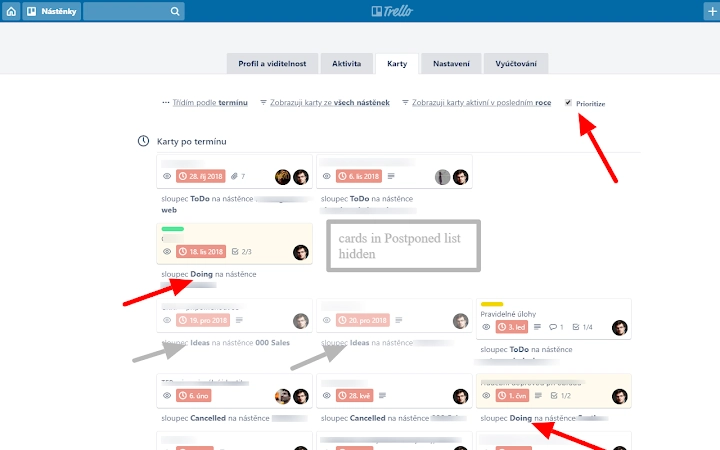
- Dynamic Card Transparency – Cards in the "Ideas" and "Postponed" lists are visually dimmed using light and heavy transparency, respectively, helping users distinguish between low-priority and inactive tasks.
- Highlighting for Active Lists – Cards in "Doing" and "To Deploy" lists are highlighted to draw immediate attention, aiding in quick identification of current work items.
- Automatic Visibility Control – Cards in "Done" and "Cancelled" lists are hidden from view, reducing clutter and focusing attention on actionable tasks.
- Flexible List Matching – The extension recognizes list names as substrings, so cards in lists like "Done 2019-09-19" are also hidden, increasing compatibility with varied naming conventions.
- Real-Time Detection – The extension monitors page and content changes, ensuring consistent behavior even after dynamic updates or navigation shifts.
These features are ideal for users managing large volumes of tasks across multiple phases. For example, a product owner can instantly identify which items are in development or awaiting deployment without manually scanning each card. Similarly, a freelancer organizing a project backlog can maintain a clean view by filtering out completed or cancelled items, improving workflow clarity and reducing distraction.
User Interface, Workflow & Performance
The extension integrates seamlessly into the Trello interface without altering the core layout or functionality. It operates as a background script, modifying card styles dynamically based on list names. Users experience no visible changes to the UI beyond the visual adjustments to card appearance, ensuring a clean and unobtrusive experience.
Navigating through the My Cards page remains consistent with standard Trello behavior. The workflow efficiency is enhanced by the automatic application of visual rules, eliminating the need for manual filtering or labeling. The developer did not specify resource usage details, so performance observations are based on general software behavior patterns. However, as a lightweight browser extension with a file size of 1.2 MB, it is expected to have minimal impact on system resources.
Stability appears to be improved with recent updates, particularly in version 1.1.1, which addressed issues with CSS class detection and page change monitoring. This ensures reliable operation across sessions and prevents disruptions during active task management. No performance bottlenecks were reported in the release notes, suggesting a stable and responsive experience.
Compatibility & System Requirements
The extension is compatible with Windows, Mac, and Linux operating systems, supporting a broad range of desktop environments. It functions as a browser-based tool, meaning it relies on standard web browsers such as Chrome, Firefox, or Edge for execution. The installation size is 1.2 MB, indicating a lightweight footprint that does not strain system storage.
Exact system requirements were not listed. Platform compatibility information is limited to the supported operating systems. The extension requires access to Trello’s web interface and is designed to work specifically with the My Cards page. It does not function within standard board views or in offline modes, as it depends on real-time interaction with the Trello web application.
Pros and Cons
Pros
- Enhances visual clarity on the My Cards page with intuitive card styling
- Automatically hides completed and cancelled tasks to reduce clutter
- Supports flexible list name matching using substrings
- Lightweight with minimal file size (1.2 MB)
- Regular updates with bug fixes and feature improvements
Cons
- Only works on the My Cards page, not within standard Trello boards
- Requires an active internet connection and Trello web access
- Does not support customization of visual rules or list names
- Developer information is not publicly available
- May not function if Trello changes its internal class structure
FAQ Section
Is the extension compatible with all Trello boards?
The extension is designed to work only on the My Cards page and does not affect standard board views.
Can I use this tool offline?
No, the extension requires an active internet connection and access to the Trello web application to function.
Is the extension secure to install?
As a browser extension with a small file size and no reported security issues, it is considered safe. Always install from official browser stores.
How often are updates released?
Updates are released as needed, with recent changes focused on improving stability and compatibility.
What happens if I change my list names?
The extension uses substring matching, so changes to list names may affect visibility rules unless the new names still contain the original keywords.
Final Thoughts
Visual Prioritization for Trello Cards delivers a focused, effective enhancement for users who rely on the My Cards page for task management. Its ability to automatically adjust card visibility and styling based on list membership significantly improves workflow clarity and reduces visual noise. While limited to a single interface within Trello, its precision and lightweight design make it a valuable addition for professionals managing complex task pipelines.
Despite the lack of developer transparency and limited customization options, the extension performs reliably and efficiently. Its regular updates and robust handling of dynamic content demonstrate a commitment to usability. For individuals and teams using Trello for personal or project-based organization, this tool offers a smart, no-frills solution to improve task visibility.
Download Visual Prioritization for Trello Cards now.







